Code within DRAW
What is the Code Editor?
The Code Editor allows to CODE simple Coded Function or Coded Action directly in DRAW. This is very useful for complex logic that can be cumbersome to do in a visual way, but not that complex for it to be done in traditional CODE:
- Small and quick logic (example below)
- Complex if/else logic
- Functional map/reduce/filter/forEach
How to use the Code Editor?
To use the Code Editor, simply create a new Coded Function or Coded Action and enter it. A new tab called Code Editor is now available alongside the Spec & Doc.
In this new tab you can edit the code directly, note that the function signature must still be done in the Spec & Doc. Once you are happy with the code, just click the save button (or press Ctrl+S) to keep it.
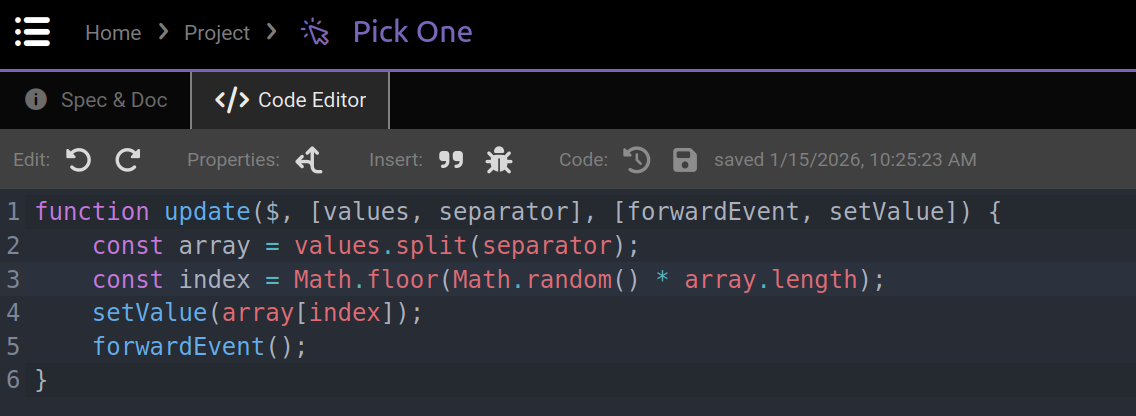
The toolbar buttons in order:
- Undo the last change
- Redo the last undo
- Toggle async/await
- Insert
``in the code (not supported with the keyboard) - Insert a
debugger;statement - Reload the saved code (undo all changes)
- Save the changes
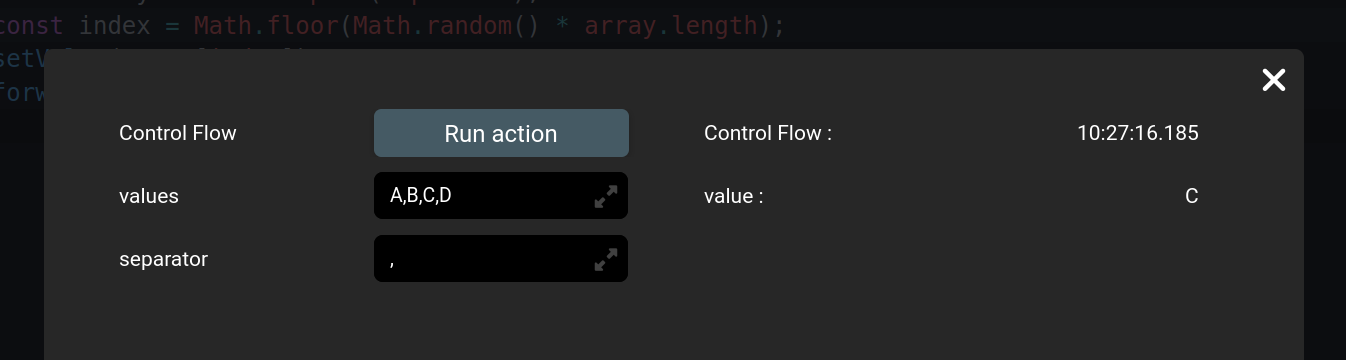
Run the code directly in DRAW
Simply press the Run icon button at the top-right of DRAW, like you would with any brick. Note that the current changes are executed, however in a running app only the saved code is executed.
Features
- Code edition
- Syntax highlighting
- Synchronization with Spec & Doc
- Async function support
Limitations
- Typescript not available
- Existing coded bricks are not editable this way
- Only simple Javascript is available
Roadmap
The Code Editor can improve in many ways, a few are listed here:
- Editor: autocompletion, linter, quality-of-life features
- Collaborative work: multiple users working on the same code
- Olympe API: can code queries and transactions, call other bricks
- Side-panels: versioning, unit testing, AI prompt
- External libraries: can import and use other libraries
- Lifecycle: can code other method of the brick (e.g: setupExecution)
- Visual Component: can code Visual Component too
Don't hesitate to contact us at support@olympe.io if you want to push for one of those feature or if you have any other ideas.